ClockfaceRetro - Retro Clockface
A dot-matrix clock over the day’s steps, active minutes and heart rate, with a battery indicator at the top. Whole face in one font.
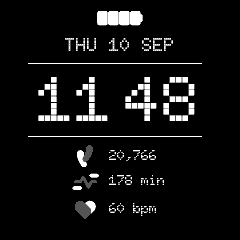
Retro in the app simulator. The step count and active minutes are the design’s sample values, fed in by hand: the simulator cannot serve the daily sensors, so both read zero when you run it yourself.
New to faces? Start with Writing a Watch Face, which covers the structure, the platform constraints and the techniques all five faces share. This page is only what is particular to Retro.
Directory |
|
|
|
|
|
|
~78 KB |
Design |
Figma |
Font |
|
What it demonstrates
Four sensor subscriptions in one service – charge, steps, active minutes and heart rate – with the three health readings published as one message, since they change on the same timescale and the face redraws the block as one.
A battery drawn as an image swap rather than a container: four supplied 46x15 bitmaps, one per 25 % band. Below the first band the indicator is taken down rather than drawn empty, because there is no artwork for an unlit battery.
A whole face in a single typeface, which keeps it to ~78 KB despite three point sizes.
A date line assembled into one wildcard –
WED 22 MAY, orWED SEP 11where the watch is set month-first, gaining|AMin the 12-hour form – from day and month names read back out of the text database. This is the case that needs those glyphs declared inWildcardCharactersas well; see the guide.
Layout
The clock is centred at runtime (kSeparator12 = 38, kSeparator24 = 11);
everything else is fixed in the Designer. Positions were checked band by band
against the supplied 240x240 render.
Doto is monospaced – every glyph 600/1000 em – which is what makes the measured centring exact and why the 12-hour form needs no extra padding around the colon.
Assets
All from the content pack: Battery1..4_46x15.png (renamed low-to-full),
StepsIcon_17x23.png, ActivityIcon_28x17.png, HrIcon_22x19.png, and the
static Doto-Black.ttf – static rather than the variable build because the
design pins the ROND axis to 0 and TouchGFX rasterises a fixed instance
anyway.
The content pack’s folder names are right and its file names are not:
Clock Face 3 Icons/holds files named “Watch Face 4”,Clock Face 4 Icons/is named “Watch Face 3”, andClock Face 5 Icons/says “Watch Face 6”. Established by matching every icon’s pixel size against the Figma group it fills. Trust the folders.
Known gaps
A change of clock is not seen until the minute turns, since the service is asleep until its next boundary. Leaving the face and returning corrects it at once, because resuming asks.
The launcher icons are placeholders in the Analogue icon’s style; the content pack carried none.
What the simulator cannot feed is listed in the guide, and applies here to the step and active-minute rows.