ClockfacePeak - Peak Clockface
Two daily-goal rings on the rim, round a stacked clock, a two-colour date line and three metric rows.
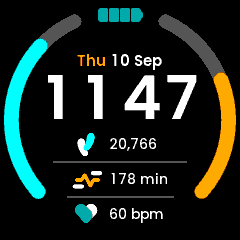
Peak in the app simulator. The step count, active minutes and goals are the design’s sample values, fed in by hand: the simulator cannot serve the daily sensors, so they read zero and the rings sit empty when you run it yourself.
New to faces? Start with Writing a Watch Face, which covers the structure, the platform constraints and the techniques all five faces share. This page is only what is particular to Peak.
Directory |
|
|
|
|
|
|
~94 KB |
Design |
Figma |
Fonts |
|
What it demonstrates
Two goal rings, and why they are two containers
Both arcs sit on one circle – centre (120, 120), radius 108.66, stroke 15.16, round caps – derived from the design’s SVG paths. All of it, including both angle ranges and all four colours, lives in the generated bases, so retuning a ring is a Designer edit with no matching code edit.
track |
fill |
design angles |
|
|---|---|---|---|
Steps (left) |
|
|
-24.75 deg to -131.15 deg |
Active minutes (right) |
|
|
+24.75 deg to +131.15 deg |
Both fills grow from six o’clock towards twelve. Because Circle sweeps
clockwise from twelve, that is not the same operation on the two sides: on
the left the track’s start is its visual bottom, on the right its end is.
// GoalArcSteps
progress.setArc(from, from + filled);
// GoalArcActivity
progress.setArc(to - filled, to);
The same split the kernel’s own face makes between ActivityBarTop and
ActivityBarBottom. Both containers also read their range off the never-mutated
background, clamp past the goal to full, and hide progress when there is
nothing to show – see the guide on arcs for why each of those matters.
The screen declares CanvasBufferSize: 3600, matching what the kernel’s home
screen uses for two rings of much the same size.
Targets travel with the presentation settings
RequestSystemSettings carries steps and activityMin alongside
timeFormat and dateMonthFirst, and they change on the same terms, so one
request fetches all four. A target of zero draws an empty ring: an unknown goal is not a met one.
Both setHealth() and setGoals() drive the rings, each reading the other half
from the presenter – a ring is a reading over a target, and either can move
alone.
A two-colour date line
The day name is amber, the rest silver, so the line is two widgets measured and
centred as a pair (layoutDate()). Wed 22 May, gaining | AM in the
12-hour form. The weekday keeps the amber half whichever way round the date
order puts the other two, and re-centring the pair is what absorbs the swap.
Layout
Clock and date are both centred at runtime; kSeparator12 = 24,
kSeparator24 = 5. The two rules are different widths – the design tapers them
– and are one-pixel Boxes, so the rings are the only thing costing an
outline. Positions were checked band by band against the design render.
Known gaps
The design asks for
UNA_Poppins Boldat 60 px and no such font exists in the repo. “UNA_Poppins” is the tabular-figures Poppins – confirmed by digit advances, all 661 against the stock build’s 646/362/574/… – and only Light, Regular, Medium and SemiBold exist in that form. SemiBold is used. A true Bold means producing a tabularPoppins-Bold.ttf; dropping in the stock font would let the clock digits jitter.The rings cannot be exercised in the simulator (see the guide). Fill and direction were checked against the design’s own drawn percentages by driving
setProgressdirectly.The launcher icons are placeholders.